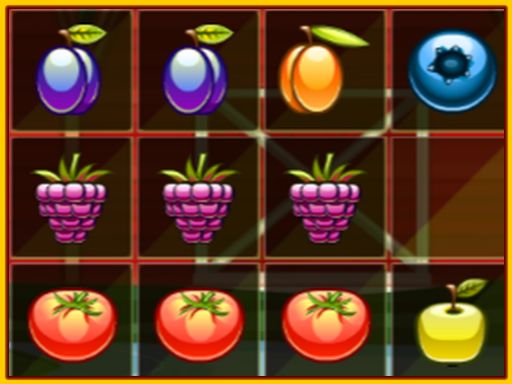
Fruit Garden Block Puzzle offers a straightforward match-3 experience on a 10x10 grid. Its lack of a timer sets it apart from many casual puzzlers, making it a good fit for players who prefer thoughtful placement over fast reactions. The fruit theme and simple controls suit all ages. The main limitation is that the core loop may feel repetitive for those seeking varied game modes or story elements.
Fruit Garden Block Puzzle uses a simple drag-and-drop system. Blocks shaped like fruit appear at the bottom of the screen. You drag them onto a 10x10 grid. The goal is to form a complete row or column of ten fruits. When a line is full, it clears and awards points. You can rotate blocks before placing them, which helps fit odd shapes into tight spaces. The game ends when no remaining block fits anywhere on the board.
There is no countdown or time limit. You can study the grid, consider different placements, and rotate pieces as needed. This design removes the pressure common in many match-3 games. Instead, it emphasizes spatial reasoning and forward planning. The challenge comes from the board filling up, not from speed. That makes it approachable for children and adults who prefer a calm pace.
As you place more blocks, free space shrinks. Success depends on spreading pieces evenly rather than clustering them in one area. Looking at the next few blocks helps you reserve room for larger shapes. Rotating a block often reveals a better fit. Because there is no penalty for taking time, you can experiment with different orientations before committing. Regular play builds familiarity with common shapes and improves placement decisions.
The fruit-themed graphics are colorful and easy on the eyes. The interface keeps controls minimal: drag, rotate, and release. No complex menus or resource management distract from the core puzzle. The family-friendly presentation and straightforward rules make it accessible to a wide audience, including younger players and anyone looking for a low-stress mental workout.






Comments
0 comments